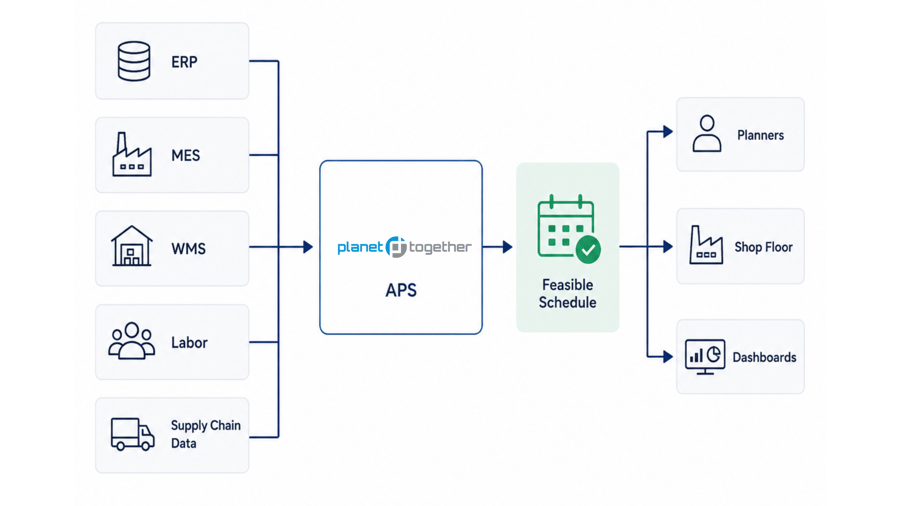

Your production schedule may depend on data spread across ERP, MES, WMS, inventory, labor, shop-floor, supply chain, and planning systems.
- Planners manually export and clean ERP data before scheduling.
- Material, labor, or capacity updates do not reach the schedule quickly enough.
- ERP dates and shop-floor reality often disagree.
- Production teams rely on spreadsheets to bridge gaps between systems.
- Late orders, shortages, or capacity conflicts are discovered too late.
- Your IT team wants a scheduling solution that complements ERP instead of replacing it.
If two or more sound familiar, your scheduling process may need a better connection between ERP, shop-floor, material, labor, and planning data.

An APS integration review can help identify where disconnected data is affecting schedule reliability.
What an APS Integration Review Includes:
- Current ERP, MES, WMS, labor, inventory, supply chain, and planning systems
- Required scheduling data, including what PlanetTogether APS receives and sends back
- Integration method options, such as API, database connection, flat-file exchange, middleware, Azure Data Factory, or iPaaS
- Field mapping, data quality, and validation requirements
- Estimated integration scope, timeline, and implementation steps

Integration Success Story | Medical Device Manufacturer Case Study
In less than 60 days, a medical device manufacturer used PlanetTogether APS to eliminate:
250 forecast-based production orders eliminated
Approximately 15% reduction in inventory overhead
Approximately 20% lower overtime labor costs
By connecting scheduling with current production and material data, the team moved from forecast-driven production to a more responsive, data-driven APS scheduling process.

.png?width=800&height=450&name=pharmaceutical%20industry%20medicine%20(3).png "Integration Success Story")
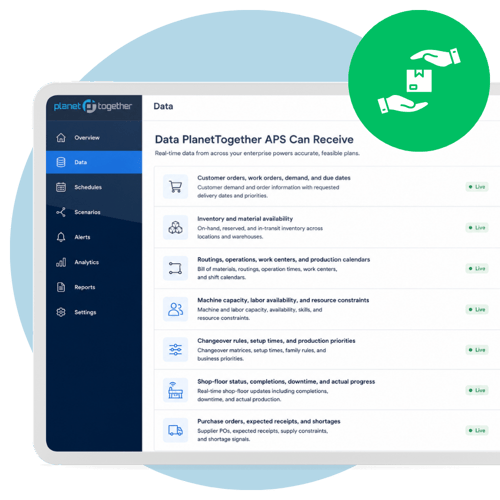

Data PlanetTogether APS Can Receive
- Customer orders, work orders, demand, and due dates
- Inventory and material availability
- Routings, operations, work centers, and production calendars
- Machine capacity, labor availability, and resource constraints
- Changeover rules, setup times, and production priorities
- Shop-floor status, completions, downtime, and actual progress
- Purchase orders, expected receipts, and shortages

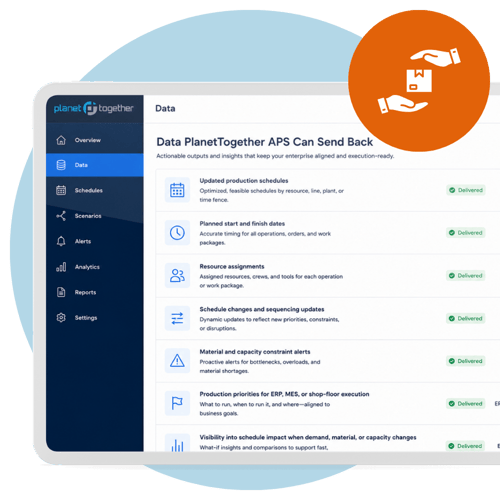
Data PlanetTogether APS Can Send Back
- Updated production schedules
- Planned start and finish dates
- Resource assignments
- Schedule changes and sequencing updates
- Material and capacity constraint alerts
- Production priorities for ERP, MES, or shop-floor execution
- Visibility into schedule impact when demand, material, or capacity changes
The key point is simple: PlanetTogether APS does not require teams to abandon the systems they already depend on. It helps those systems work better together by turning business, inventory, and production data into an executable schedule.
See which data connections would support a more realistic production schedule.

Keep schedules aligned with current data
Use connected order, inventory, material, labor, and shop-floor data to reduce outdated scheduling assumptions.

Reduce manual schedule updates
Limit repeated exports, spreadsheet cleanup, and rekeying between ERP, MES, WMS, and planning systems.

Expose material and capacity constraints earlier
Help planners see when shortages, overloaded resources, labor gaps, or downtime may affect production.

Support better scenario planning
Compare schedule options using current operating data before changing priorities, promising dates, or releasing work to the floor.