
Every day, we encounter manufacturers who are stuck with ERP, legacy or in-house developed systems to try to manage production scheduling. Yikes. That’s like trying to bank a curve at Indy in a Hummer.
As a result, planners and schedulers rely on manually rigged solutions, or they build complicated, error-prone Excel spreadsheets. Oh, they’re missing a universe of shining functionality and simplicity. And the whole company is missing out on serious productivity improvements. We scratch our heads and resolve to do a better job of getting the word out—there’s a better way.
Why don’t manufacturers explore APS options? Outdated beliefs that integrating an APS to the ERP is expensive, time-consuming and one long headache. But it doesn’t have to be that way.
When using PlanetTogether APS one of the first steps is to decide what level of integration to your other systems will work best for you, and one of our success consultants will help guide you in the decision: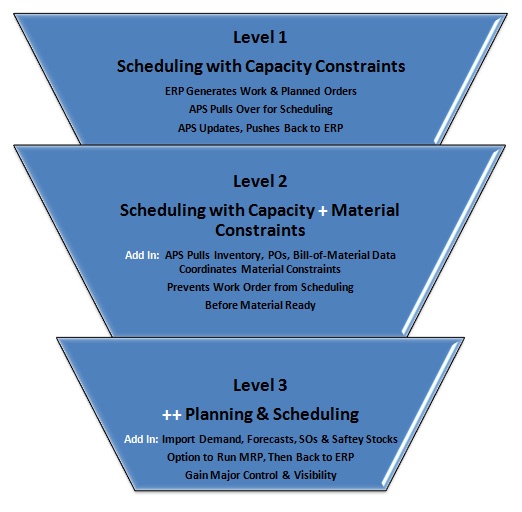
Not to oversimplify your decision process, APS integration really is a lot more straightforward than the industry would lead you to believe. See our success factors.
Be assured that PlanetTogether excels in developing ERP connectors for smooth as silk integrations. If your ERP solution isn’t already listed below, we’ll take on the task to create a custom connector for you:
We also work closely with all these ERP solutions and supply chain planning systems:
Let’s keep this simple because it is:
1. Expect out-of-the-box integrations to get you 90% of the way there.
A pre-set foundation that’s easily tuned to particular set of client needs is essential. You save time upfront front by getting the general data flows standard and then can configure them to precisely match the needs of your business.
2. Make data available, but (whew) it doesn’t have to be 100% “clean” on Day 1.
You can start with the basics (orders, routings) and expand as needed in phases (such as detailed setup information or custom scheduling rules). The “crawl”, “walk”, “run” approach is a great way to go so that you get incremental value quickly and have time to get comfortable with your system gradually. The more you learn the more opportunity you’ll see to keep improving.
3. Sketch the flow on paper for clarity for everyone before actual integration work begins.
Each project starts with a “Design Document” to clearly layout the business strategy and target KPI behind your new APS process, the business processess that will be affected, and data flow diagrams. This means you have clear vision of the solution that everyone understands and it ensures that the end results will deliver as expected.
Our integration experts have completed hundreds of installations over the past twenty years.


